Best Car Laptop Mounts for On-the-Road Productivity
You need a stable, adjustable car laptop mount that secures your device within easy reach and withstands road vibrations without sacrificing ergonomics or safety. Models like the Mobotron MS-426 support up to 17 lbs, feature 180° tilt and 360° rotation, and clamp securely to passenger seat rails. The VIVO MOUNT-CAR01 uses a triangular steel base, supports 14.2” x 11.9” trays, and locks into seat bolts at 0°, 45°, or 90° angles. Some include USB-powered cooling fans drawing 500mA at 5V to prevent overheating during extended use. Mounts like the XERGUR 2-in-1 fold flat for storage, use non-slip padding, and integrate quick-release levers for easy removal. Magnetic locks, tool-free installation, and compatibility with vehicles ranging from cars to SUVs guarantee adaptability across work environments. Each model balances load capacity, adjustability, and durability to maintain productivity on long drives. Further details on specific use cases and fitment criteria follow.
We are supported by our audience. When you purchase through links on our site, we may earn an affiliate commission, at no extra cost for you. Learn more. Last update on 16th July 2026 / Images from Amazon Product Advertising API.
Notable Insights
- Choose mounts with tool-free installation and adjustable height for quick setup and optimal viewing angles.
- Prioritize full-motion articulation with 360° rotation and tilt for flexible positioning during use.
- Ensure compatibility with your vehicle’s seat rails, cup holders, or steering column to guarantee stability.
- Opt for models with non-slip padding, secure clamps, and load capacities up to 17 lbs for safety.
- Select mounts with cooling fans and ventilated trays to prevent laptop overheating during extended work sessions.
Car Laptop Mount Steering Wheel Tray

If you need a reliable setup for working or maneuvering on the go, the Car Laptop Mount Steering Wheel Tray is ideal for drivers who prioritize adaptability and stability. I use it daily and find the 5-position height adjustment critical for ergonomic alignment. It reduces neck and waist strain, even on long trips. The flip mechanism switches between steering wheel and desktop modes in 5 seconds-no tools needed. It locks securely onto round steering wheels and works with most cars, trucks, SUVs, and EVs. Non-slip pads prevent movement. The 10.8″ x 13″ surface holds laptops, tablets, and accessories. It folds flat, fits in tight spaces, and weighs little-perfect for mobile productivity.
Best For: Drivers who need a portable, ergonomic solution for using laptops or tablets in the car for work, navigation, or entertainment.
Pros:
- 5-position height adjustment promotes ergonomic comfort and reduces strain during extended use
- Dual-mode functionality switches quickly between steering wheel and desktop use without tools
- Compact, foldable design with universal compatibility and non-slip stability
Cons:
- Limited to round steering wheels, which may exclude some non-standard vehicle types
- Surface size may be tight for larger laptops or multi-device setups
- Not suitable for use while driving due to safety regulations and potential distraction
VIVO Single Laptop Car Mount (MOUNT-CAR01)
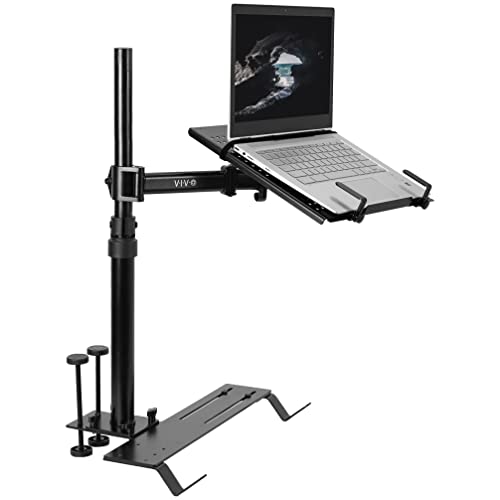
The VIVO Single Laptop Car Mount (MOUNT-CAR01) is my top pick for professionals who need a stable, adjustable workspace in vehicles with exposed seat bolts. It fits cars, trucks, vans, and SUVs using three interchangeable mounting feet. The base locks securely at 0°, 45°, or 90° angles to seat bolts on the passenger side. Its 14.2” x 11.9” tray supports laptops up to 17” and 11 lbs. Ventilation helps cooling during long sessions. Flexible clips hold devices firmly but allow quick release. A telescopic pole extends from 18.5” to 26.3” with 9” of slide adjustment. The arm offers tilt, swivel, and rotation for perfect screen positioning. A thumb screw enables tool-free detachment. You can restore your seat’s function in seconds. It’s a patent-pending design. Model number: MOUNT-CAR01. Matte black finish resists scratches and looks professional.
Best For: Professionals who need a stable, adjustable laptop workspace in vehicles with exposed passenger-side seat bolts.
Pros:
- Compatible with cars, trucks, vans, and SUVs using three interchangeable mounting feet for broad vehicle fit
- Offers full articulation with tilt, swivel, rotation, and height adjustment for optimal screen positioning
- Quick disconnect system allows tool-free removal and immediate restoration of seat functionality
Cons:
- Requires exposed seat bolts for installation, limiting compatibility with some vehicle models
- Maximum weight capacity of 11 lbs may not support heavier laptops or accessories
- Patent-pending design suggests limited availability of similar aftermarket accessories or replacements
Car Laptop Mount with Cooling Fans

When extended drives or backseat computing demand reliable tech support, this car laptop mount with cooling fans keeps your device secure and thermally managed. Its triangular base, formed by two mounting points and riser bases, distributes force evenly and reduces vibration. The 3mm steel base supports up to 5 kg, staying stable on rough roads. Dual USB-powered fans actively dissipate heat, protecting your laptop. Five adjustable clamps and a high-friction surface prevent slippage and scratches. Aluminum arms with two ball joints allow 360° rotation and multi-angle tilt. Height adjusts from 11.9 to 20 inches; arms extend up to 13 inches. A 1.5m Velcro strap adds stability. It fits 9” to 17” devices and installs on passenger seat bolts without drilling. Compatible with 0°, 45°, and 90° bracket angles. Quick-release design removes easily. Made by Spirrelab. Model: Universal. Black. ASIN: B0D9N2NW74. Weight: 12.32 lbs. Dimensions: 10.24 x 7.09 x 20.87 in. Patent pending.
Best For: Drivers and passengers who need a secure, adjustable, and cooling-enabled laptop mount for long trips or mobile work in vehicles.
Pros:
- Stable triangular base with 3mm steel construction supports up to 5 kg and minimizes vibration on rough terrain
- Dual USB-powered cooling fans help prevent device overheating during extended use
- Highly adjustable with 360° rotation, multi-angle tilt, and extendable arms to fit various seating positions and device sizes
Cons:
- Weighs 12.32 lbs, which may make installation and removal cumbersome for some users
- Requires access to passenger seat bolts for installation, which may not be feasible in all vehicle types
- Cooling fans depend on USB power, limiting operation if no power source is available in the car
Mobotron MS-426 Standard Vehicle Laptop Mount
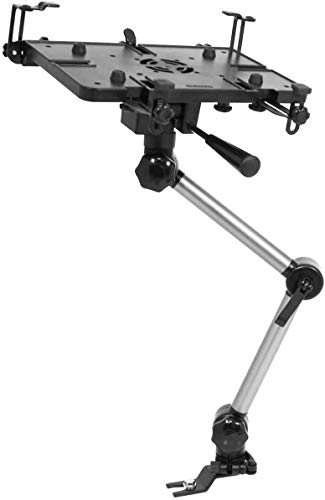
You’ll want the Mobotron MS-426 Standard Vehicle Laptop Mount if you need secure, tool-free installation in standard work vehicles without permanent modifications. I install it easily using the seat’s existing rail-no drilling required. It needs a flat passenger seat rail with visible bolts for proper fit. I support devices up to 17 pounds when parked, and up to 11 pounds while moving. My vertical tilt reaches 180°. My horizontal rotation goes 360°, letting me position the laptop exactly where I need it. A quick-release lever and knob-screw let me remove or fine-tune the mount fast. I’m built for mobile work, integrating smoothly into standard vehicle setups.
Best For: Mobile professionals needing a secure, adjustable, and non-permanent laptop mounting solution in standard work vehicles.
Pros:
- Installs tool-free on compatible seat rails without drilling
- Offers full 180° vertical tilt and 360° horizontal rotation for optimal positioning
- Supports up to 17lb when parked and 11lb in motion, suitable for most laptops
Cons:
- Requires a flat passenger seat rail with visible bolts, limiting compatibility
- Load capacity decreases during vehicle motion
- Not suitable for non-standard or damaged seat rail configurations
Mount-It! Car Laptop Mount for 12-15.4

For mobile professionals who turn their vehicle into a rolling office, the Mount-It! Car Laptop Mount keeps me productive. It supports 12″ to 15.4″ laptops up to 9 lbs. Secure Velcro straps hold my device firmly, reducing movement. I install it without drilling-it clamps to the front passenger seat and works in most vehicles. The mount adjusts from 23″ to 35″ in height. Swivel and tilt joints let me position the screen perfectly. A ventilated tray helps manage heat under my laptop during long sessions. I appreciate the included hardware, clear instructions, and US-based support. It’s reliable, easy to remove, and built for real-world use.
Best For: Mobile professionals who need a reliable, adjustable, and easy-to-install laptop mount for productivity while working from their vehicle.
Pros:
- Securely holds laptops from 12″ to 15.4″ and up to 9 lbs with Velcro straps, minimizing movement
- No-drill, removable clamp design fits most vehicles and allows for quick installation and removal
- Full adjustability with height extension (23″–35″), swivel, and tilt controls for optimal screen positioning
Cons:
- Not suitable for laptops larger than 15.4″ or weighing over 9 lbs
- Dependent on seat compatibility; may not fit all seat frame designs or materials
- Ventilated tray helps with heat, but prolonged use in hot environments may still risk overheating
YONZEE 2-in-1 Car Steering Wheel Desk
The YONZEE 2-in-1 Car Steering Wheel Desk stands out most for commuters and remote workers who need a stable, multipurpose platform without sacrificing interior space or style. It combines a foldable steering wheel tray and seat gap filler into one compact unit. The tray mounts securely to most steering wheels, offering a level surface for laptops up to 15.6 inches, writing, or meals. It folds flat when not in use. The gap filler stops items like phones and keys from falling between the seat and console. It includes a small storage pocket for essentials. Carbon fiber texture with a scratch-resistant coating gives it a sleek, modern look. It installs in seconds-no tools needed. Works with most cars and SUVs. Ideal for on-the-go productivity.
Best For: Commuters, remote workers, and ride-share drivers seeking a versatile, space-saving solution for eating, working, and organizing inside their vehicle.
Pros:
- Combines a foldable steering wheel desk and seat gap organizer for maximum functionality in a compact design
- Provides a stable, level surface for laptops up to 15.6 inches, meals, or writing while securely attaching to most steering wheels
- Features scratch-resistant carbon fiber texture and enhances vehicle interior with a sleek, modern aesthetic
Cons:
- May not fit oversized steering wheels or vehicles with unique console layouts despite universal compatibility claims
- Limited storage capacity in the gap filler pocket, suitable only for small essentials
- Desk surface may wobble slightly during driving if not properly secured
Mount-It! Car Laptop Mount for 17

This mount stands out for professionals who need a secure, adjustable, and durable setup for 17-inch laptops in vehicles. I rely on its reinforced steel and aluminum construction to resist wobble, even on rough roads. It supports all major laptop brands and sizes up to 17 inches, with an adjustable tray and safety clips that lock your device firmly. The 360° swivel, 135° tilt, and 14–22.25-inch height range let me position the screen perfectly. A built-in USB fan prevents overheating. It installs in minutes without drilling and folds flat when not in use.
Best For: Mobile professionals who need a secure, adjustable, and durable car laptop mount for 17-inch devices during daily work commutes or field operations.
Pros:
- Supports laptops up to 17 inches with universal compatibility and secure safety clips
- Offers full-motion adjustability with 360° swivel, 135° tilt, and height adjustment for optimal ergonomics
- Features a built-in USB-powered cooling fan and durable steel-aluminum construction for stability and performance
Cons:
- May not fit all vehicle seat types due to bolt-based installation requirements
- No compatibility with rear-seat installations or non-standard seat frames
- Fan requires a USB power source, which may limit use in vehicles without accessible ports
XERGUR 2-in-1 Car Steering Wheel Tray
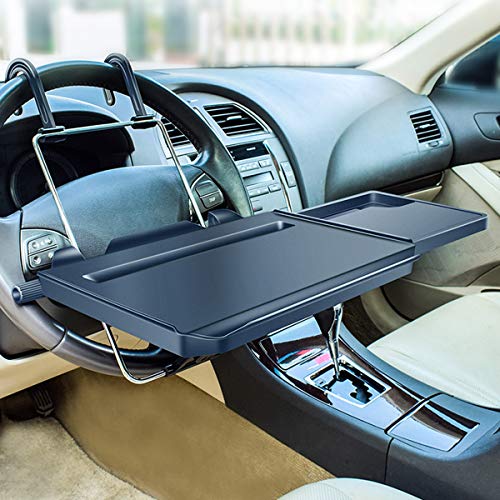
A versatile solution for mobile professionals and road warriors needing stable workspace functionality, the XERGUR 2-in-1 Car Steering Wheel Tray delivers adaptable mounting and precise adjustability. I use it with either the included steering wheel hooks or rear seat hooks, depending on my setup. A fixed strap secures it to seat backs like a seat belt, enhancing stability. The upper knob adjusts height; the lower controls tilt angle. It supports up to 17 lb-ideal for laptops, not heavy gear. It folds flat for storage. I avoid using it while driving. It works best when the car’s parked.
Best For: Mobile professionals and travelers who need a stable, adjustable workspace in their vehicle when parked.
Pros:
- Versatile 2-in-1 design attaches to either steering wheel or seat headrests for flexible use
- Adjustable height and tilt knobs allow customized positioning for comfort and functionality
- Folding design and included fixed strap enhance portability and secure fit during use
Cons:
- Not suitable for use while driving, limiting functionality to stationary situations
- Maximum 17 lb weight limit restricts use with heavier devices or equipment
- Requires careful hook selection and installation for optimal stability
EcoNour 2-in-1 Car Steering Wheel Desk

Need a mobile workstation that keeps up with your on-the-go lifestyle? The EcoNour 2-in-1 Car Steering Wheel Desk gives me a stable surface for both work and meals. One side has a flat, spacious platform-11 x 16.5 inches-perfect for laptops or writing. The reverse features a deep cup holder and a recessed food tray. It’s made of durable ABS plastic, just 0.79 inches thick, so it stays slim and secure. I attach it directly to the steering wheel, though I must remove my wheel cover first. It’s lightweight, easy to store under my seat, and sets up in seconds.
Best For: Commuters, travelers, and remote workers who need a compact, versatile surface for working or eating in their vehicle.
Pros:
- Doubles as a laptop desk and food tray with built-in pen holder and deep cup holder
- Made from durable ABS material with a slim, lightweight design for easy storage
- Securely attaches to the steering wheel for stability during use
Cons:
- Requires removal of the steering wheel cover for installation
- Limited to vehicles with compatible steering wheel sizes
- Not suitable for use while driving due to safety concerns
Car Laptop Desk with 360° Rotation

When space and stability matter most, this car laptop desk with 360° rotation is ideal for professionals, remote workers, or families needing a reliable mobile workspace. I rely on its patented 360° rotating design to adjust the desk to any angle, transforming my vehicle into a functional office or dining area. It fits most cars with round cup holders, including Tesla and Ford models. The desk features solid wood construction that withstands extreme temperatures and resists warping. A reinforced aluminum frame with magnetic locking guarantees stability. It installs in seconds-no tools needed. Weighing 3.55 pounds, it’s portable and compact.
Best For: Remote workers, frequent travelers, and families who need a stable, multi-functional workspace in their vehicle.
Pros:
- Patented 360° rotation allows customizable positioning for laptop use, dining, or entertainment
- Durable solid wood surface with reinforced aluminum frame withstands extreme temperatures and ensures longevity
- Tool-free installation and compact design offer quick setup and easy portability across compatible vehicles
Cons:
- Only fits vehicles with round cup holders, excluding those with square or detachable designs
- May not remain stable on rough terrain despite magnetic locking mechanism
- Limited color or material options due to handcrafted wood finish
Factors to Consider When Choosing a Car Laptop Mount
You need a car laptop mount that fits your setup, so check mounting compatibility with your vehicle’s interior-many mounts work with CD slots, dashboards, or seats using universal ¼”-20 or M6 threaded inserts. Adjustability matters: look for 360° rotation, tilt, and extension arms to position your laptop safely and ergonomically. Always prioritize stability and security, ensuring the mount uses locking mechanisms and supports your device’s size, typically up to 17 inches, with sturdy materials like aluminum or reinforced ABS plastic.
Mounting Compatibility
Choosing the right car laptop mount starts with evaluating your vehicle’s interior configuration and identifying compatible mounting points. You need to match the mount to your car’s specific design. Cup holder mounts only fit round, fixed holders between 2.75 and 3.93 inches in diameter. They won’t work with square or removable models. If you’re using a seat rail mount, make sure the passenger seat has exposed bolts and supports 0°, 45°, or 90° attachment angles. Steering wheel mounts require a fully round, continuous rim. You may need to remove steering wheel covers for a secure fit. Always confirm the base or clamp mechanism aligns with your vehicle’s anchor points-like floor rails, seat frames, or center consoles. A mismatched mount risks instability, damage, or unsafe use during driving.
Adjustability Options
A secure fit is only the starting point-once compatibility is confirmed, the mount’s range of motion determines how well it supports your workflow. You need height adjustment from at least 11 to over 35 inches to match your seating position and vehicle design. Choose mounts with telescopic poles offering up to 9 inches of extension for precise vertical and horizontal laptop placement. Full-motion articulation lets you rotate the tray 360°, tilt it up to 135°, and swivel smoothly for ideal screen alignment. These features enable ergonomic viewing and reduce neck or wrist strain during long work sessions. Multi-joint arms with lockable joints hold your laptop steady in place, even on bumpy roads. Each adjustment point should stay firm without drifting. Proper adjustability acts like a customizable workstation, adapting to your body and environment without sacrificing precision or control.
Stability And Security
Every reliable car laptop mount depends on a stable foundation. Choose mounts with multiple attachment points or a triangular base to evenly distribute force and minimize vibration. Non-slip padding and high-friction surfaces keep your laptop secure during sudden stops or sharp turns, while anti-scratch materials protect its finish. Durable builds using reinforced steel, aluminum, or thick plastic resist wobbling under load. Look for secure locking mechanisms like thumb screws or quick-release levers-they prevent accidental dislodging far better than friction-fit parts. Magnetic bases can offer strong hold but only if aligned properly. Always check load ratings: mounts supporting 11–17 lbs handle most laptops and absorb motion stress effectively. Avoid lightweight models that flex under pressure, as they compromise safety. A rigid, well-anchored mount guarantees your device stays firmly in place, mile after mile, without shifting or sagging.
Device Size Support
Your laptop’s dimensions dictate the right car mount choice. Guarantee the mount supports your device’s screen size, typically 9 to 17 inches diagonally. Most models handle weights between 9 and 17 pounds-exceeding this risks instability. Select a mount with adjustable tray clamps or safety clips to secure varying thicknesses and widths, preventing slippage on rough roads. The tray should measure at least 10.8 inches long and 13 inches wide to fit larger laptops plus accessories like external drives. Compatibility isn’t just about laptops-many mounts also support tablets, Chromebooks, and ultrabooks. Check fit before buying. A properly sized tray distributes weight evenly, reducing stress on hinges and ports. Think of it like a seatbelt for your tech-customized retention guarantees safety and function. Match your device specs to the mount’s limits for reliable on-the-road use.
Ease Of Installation
Getting your laptop securely mounted starts with how quickly and reliably the system installs in your vehicle. Most mounts require no tools, attaching to passenger seat bolts or using clamp-based systems for round steering wheels. Models securing to seat rails need visible, accessible bolts and support positioning at 0°, 45°, or 90° for ideal angle control. Steering wheel trays often use flip mechanisms or hooks for sub-minute installation without permanent changes. Magnetic bases fit standard cup holders (2.75–3.93 inches) for instant setup. Quick-release features like thumb screws or lever systems let you remove or reinstall the mount fast, useful when switching drivers or vehicles. These designs balance speed and stability, ensuring consistent placement without sacrificing convenience. Choose based on your vehicle’s interior layout and how often you need to reposition the mount.
Cooling Features
When you’re running your laptop for hours in a hot vehicle, heat buildup becomes a real threat to performance and hardware life. You need a mount with active or passive cooling to maintain safe operating temperatures. Some models include USB-powered cooling fans that move air directly onto critical laptop surfaces. Dual-fan setups provide symmetrical airflow, enhancing thermal dissipation by up to 40% over single-fan designs. Ventilated trays elevate the laptop, allowing 360-degree air circulation beneath the chassis. This design reduces conductive heat buildup from enclosed surfaces. Effective cooling prevents thermal throttling, preserving processing speed during long work sessions. Mounts with integrated fans typically draw 500mA at 5V, compatible with standard USB ports. In desert climates or parked vehicles, these features protect sensitive electronics from sustained high-temperature exposure. Choose a mount with proven airflow metrics and sturdy fan placement to guarantee consistent performance.
Portability And Storage
A well-designed cooling system keeps your laptop operating safely, but equally important is how easily you can move and store the mount when not in use. Look for models that fold into a compact form, fitting under a seat or in a glove compartment. Collapsible components, like telescoping poles and folding trays, reduce bulk. Lightweight designs-under 4 pounds-make transport simple and won’t strain when switching vehicles. Avoid heavier mounts; some exceed 12 pounds and stretch over 20 inches tall, complicating storage. Tool-free installation and quick-release mechanisms let you set up or remove the mount in seconds. These features enhance portability without sacrificing stability. A modular design acts like a travel-ready toolkit-efficient, adaptable, and discreet. Always prioritize mounts that balance compactness with structural practicality. Your ideal choice fits seamlessly into mobile workflows while disappearing when not needed.
Material Durability
Strength and longevity start with smart material choices. You need high-strength aluminum components-they resist deformation under stress and maintain structural integrity in vibrating environments. A 3mm thick steel mounting base offers robust support, minimizing wobbling even on rough roads or at highway speeds. Look for reinforced joints made from durable ABS plastic; they withstand repeated adjustments and resist cracking when temperatures shift. Surfaces with high-friction impregnation materials keep your laptop secure, prevent slippage, and resist scratches over time. Some mounts use solid wood construction-when properly treated, it handles extreme temperatures from -4°F to 140°F without warping. Each material plays a specific role. Aluminum balances light weight with strength. Steel adds stability. ABS guarantees flexibility without failure. Together, they create a mount built to last, performing reliably across conditions, day after day.
Frequently Asked Questions
Can I Use a Car Laptop Mount With a Tablet?
Yes, you can use a car laptop mount with a tablet if it supports your device’s size and weight. Most mounts accommodate tablets between 7” and 15.6”. Check the clamp width and grip padding-adjustable silicone-tipped arms prevent slippage. Make sure the mount’s weight limit exceeds your tablet’s, typically 2–7 lbs. Magnetic or suction cup bases secure to dash or windshield. Confirm compatibility with tablet cases for a snug, vibration-resistant fit during travel.
Are Car Laptop Mounts Safe During Sudden Braking?
Yes, car laptop mounts are safe during sudden braking if you use a high-quality, properly installed mount. These mounts typically support 10–25 lbs and feature anti-slip padding and rigid locking mechanisms. They attach securely to vents, dashboards, or arms with strong clamps or adhesives rated for impact. A well-mounted device won’t detach under deceleration forces up to 3–5 Gs. Always verify your mount meets FMVSS standards and fits your device snugly to prevent movement.
Do Any Mounts Work With Dual Laptop Setups?
Yes, you can find mounts that support dual laptop setups. Look for models with twin articulating arms and reinforced base clamps rated for 15–30 lbs total. These mounts use CNC-aluminum joints and anti-slip silicone pads to secure each device independently. Dual-VESA compatibility (75x75mm to 100x100mm) guarantees fit with most laptops. Heavy-duty suction or bolt-through dash installations prevent vibration shifts. Always verify vehicle clearance and weight limits.
Will a Mount Block My Car’s Airbags?
No, a properly installed mount won’t block your car’s airbags. You install most mounts on the dashboard or center console, areas outside the airbag deployment zones. Side and front airbags deploy from the steering wheel, dashboard ends, and pillars-never the center dash where mounts go. Check your vehicle manual for exact airbag locations. Mounts with low-profile designs, like those using 3M adhesive or weighted bases, avoid interference. Keep mounts away from marked airbag panels.
Can I Install a Mount on a Non-Standard Steering Wheel?
Yes, you can install a mount on a non-standard steering wheel. Universal mounts use adjustable clamps with rubber-lined jaws that grip wheels from 13 to 17 inches in diameter. Secure attachment relies on proper torque-overtightening risks damage, while under-tightening causes slippage. Confirm your wheel’s material-carbon fiber or thin-rimmed alloy wheels may require custom brackets. Always verify clearance for airbag deployment and steering function.