The Best Heads Up Displays for a Smarter Drive
You get real-time speed, GPS accuracy, and auto-adjusting brightness with top HUDs like the CNSPEED V3 and W2. They use GPS+BDS dual-mode chips, lock onto 32 satellites, and refresh at 10Hz for ±1 km/h precision. HD green LED displays stay clear in sunlight or night, thanks to anti-reflective shields and 11 brightness levels. Plug-and-play USB or OBD2 setups sync with ignition. Models like the 3.5” OBD2 HUD add engine temp and voltage alerts. You’ll find which model fits your vehicle’s tech next.
We are supported by our audience. When you purchase through links on our site, we may earn an affiliate commission, at no extra cost for you. Learn more. Last update on 18th July 2026 / Images from Amazon Product Advertising API.
Notable Insights
- Choose a HUD with GPS+BDS dual-mode for faster, accurate speed tracking and minimal lag.
- Look for auto-brightness and anti-glare features to ensure visibility in all lighting conditions.
- Opt for models with plug-and-play USB or OBD2 installation for quick, tool-free setup.
- Select a HUD that displays speed, time, distance, and overspeed alerts for enhanced driving awareness.
- Ensure compatibility with your vehicle’s power system and support for stable GPS signal acquisition.
Car HUD Display with GPS & Auto Brightness

If you need precise, real-time speed tracking without taking your eyes off the road, the Car HUD Display with GPS & Auto Brightness is your best choice. I rely on its dual-mode GPS + BDS connectivity, which locks onto up to 32 satellites and refreshes at 10Hz for stable readings. Under standard conditions, speed deviation stays minimal-just 0.6 to 1.8 MPH. It projects a large MPH readout, visible up to 115 MPH, directly into my line of sight. An intelligent light sensor adjusts brightness automatically, cutting glare at night. It’s USB-powered, works in most vehicles, and requires no OBD connection.
Best For: Drivers seeking a reliable, non-distracting speed display with real-time GPS tracking and automatic brightness adjustment for safer, eyes-on-the-road driving.
Pros:
- Projects large, clear speed readout directly into driver’s line of sight for improved safety
- Auto-adjusting brightness with intelligent light sensor ensures optimal visibility day and night
- Plug-and-play USB setup with no OBD connection required, compatible with most vehicles
Cons:
- Performance may degrade in tunnels, underground areas, or with metallic windshield coatings
- Minor speed deviation of 0.6–1.8 MPH possible under standard conditions
- Relies on GPS signal, which can be affected by heavy rain, fog, or poor satellite visibility
Car HUD Digital GPS Speedometer

The Car HUD Digital GPS Speedometer is my top pick for drivers who want real-time speed tracking without relying on their vehicle’s OBD port. It uses GPS + BDS dual-mode technology, locks onto up to 32 satellites, and refreshes data at 10Hz for smooth, accurate readings. Speed deviation averages just 0.6–1.8 MPH under clear skies. The head-up display projects your speed directly onto the windshield, keeping your eyes on the road. An intelligent light sensor adjusts brightness automatically, day or night. Anti-reflective metal shading and large fonts guarantee visibility, even with sunglasses. It runs on 5V USB power-plug and play. Works in most cars, trucks, and motorcycles with a USB port. Signal may drop in tunnels or heavy weather. Metallic windshield films can interfere. Support responds within 24 hours.
Best For: Drivers seeking a reliable, plug-and-play digital speedometer that enhances safety by displaying real-time speed on the windshield without needing an OBD connection.
Pros:
- Utilizes GPS + BDS dual-mode technology with 10Hz refresh rate for fast, accurate, and stable speed tracking
- Projects speed directly onto the windshield with automatic brightness adjustment and anti-reflective design for excellent visibility in all lighting conditions
- USB-powered with no OBD port required, making it compatible with most cars, trucks, and motorcycles
Cons:
- GPS signal may be lost in tunnels, underground garages, or during heavy rain/fog
- Metallic windshield films can interfere with GPS reception and display clarity
- Dependent on clear satellite visibility for optimal performance, limiting accuracy in obstructed environments
ARTILAURA Digital Speedometer HUD Display for Cars

I rely on GPS satellite signals for real-time speed tracking with the ARTILAURA Digital Speedometer HUD Display, making it ideal for drivers who demand accuracy independent of their vehicle’s internal systems. It shows speed from 0–199 km/h or mph and includes a built-in compass for direction (N/S/E/W). I use the 3-level speed alarm to stay safe. The 3-inch screen has 11 brightness levels and auto-adjusts via photosensitive mode. I plug it into any 5V USB port-no setup needed. I fine-tune speed readings between 50–150 for precision. A rotary knob controls settings. It measures 4 x 3.2 x 3.2 inches and weighs 4.8 oz.
Best For: Drivers seeking a reliable, GPS-based speedometer with easy installation and real-time speed tracking independent of their vehicle’s systems.
Pros:
- Delivers accurate speed and direction data via GPS, unaffected by vehicle system variations
- Offers adjustable brightness with auto-dimming for optimal visibility in all lighting conditions
- Simple plug-and-play setup with universal compatibility and intuitive rotary knob controls
Cons:
- Limited to 5V USB power, making it vulnerable to damage from incorrect power sources
- Speed calibration range (50–150) may not cover all edge cases for highly modified vehicles
- Compact screen size may restrict readability for some users at a glance
Car HUD Speedometer Display with Automatic Brightness

You get real-time speed tracking with a Car HUD Speedometer Display that adapts instantly to changing light conditions. Its intelligent light sensors adjust brightness automatically, ensuring clear visibility day and night. I rely on dual-mode chip technology-GPS and BDS-processing up to 32 satellite signals at a 10 Hz refresh rate for fast, accurate data. Speed readings show up to 115 mph in large, easy-to-read font, minimizing reflections with metal shading. A slight deviation of 0.6–1.8 mph is normal. It warns me with audible alerts or visual flashes when I exceed preset limits. I plug it in easily via USB-no complex setup.
Best For: Drivers seeking a reliable, easy-to-install heads-up speedometer with automatic brightness and real-time GPS/BDS accuracy for safer day and night driving.
Pros:
- Delivers fast, accurate speed tracking using dual-mode GPS and BDS with 10 Hz refresh rate and support for up to 32 satellites
- Automatically adjusts screen brightness via intelligent light sensors for optimal visibility in all lighting conditions
- Features large, glare-reducing display with audible and visual speeding alerts to enhance driver safety
Cons:
- Slight speed deviation of 0.6–1.8 mph may occur, which, while normal, could affect precision-sensitive users
- Performance can be degraded by metal-based window films or in signal-blocking environments like tunnels and underground garages
- Limited to a maximum display of 115 mph, which may not suit high-speed driving on certain roads or vehicles
GPS HUD Speedometer for Cars
Need accurate speed data without taking your eyes off the road? I rely on the GPS HUD Speedometer for precise readings using both GPS and BDS dual-chip technology. It delivers real-time speed with a fast refresh rate and minimal delay. The HD display shows clear, bright green numbers up to 199 mph. Automatic brightness adjusts for day or night, and the included light shield reduces glare. It’s compact-just 3.63 x 2.00 x 0.87 inches-and weighs only 4.03 oz. Made of durable ABS plastic, it fits discreetly on your dashboard. Powered via USB, it works with cars, SUVs, and trucks. No setup hassle-plug in, wait 1–3 minutes for satellite lock, and go.
Best For: Drivers seeking a reliable, easy-to-use heads-up display for real-time speed monitoring without obstructing their view or requiring complex installation.
Pros:
- Utilizes GPS and BDS dual-chip technology for accurate, low-latency speed readings
- Features an HD bright green display with auto-adjusting brightness and glare-reducing light shield
- Compact, lightweight design with simple plug-and-play USB setup compatible with most vehicles
Cons:
- Performance may degrade in signal-blocked areas like tunnels or underground garages
- Requires 1–3 minutes for satellite acquisition before use
- Adhesive mounting may not be secure on all dashboard surfaces over time
Windshield HUD Speedometer for All Vehicles

A windshield HUD speedometer that projects GPS-based data directly onto the windscreen offers a seamless, universal fit for all vehicle types, making it ideal for drivers seeking a clutter-free, modern upgrade without vehicle-specific compatibility concerns. I use GPS to display real-time speed in MPH or KM/H, plus clock, travel time, distance, and compass direction. An overspeed alarm beeps when I exceed your preset limit. Signal acquisition requires open sky view; metalized tint or nearby GPS devices can interfere. I connect via USB, power on with the engine, and offer 11 manual brightness levels-or automatic light sensing at level 0. Calibration adjusts speed discrepancies up to ±3%.
Best For: Drivers seeking a universal, easy-to-install heads-up display that enhances safety and convenience with real-time GPS speed and vehicle data without requiring vehicle-specific compatibility.
Pros:
- Universal fit for all vehicles with plug-and-play USB installation and automatic power on/off with engine
- Displays multiple GPS-based metrics including speed, clock, travel time, distance, and compass direction with switchable MPH/KM/H
- Customizable brightness with automatic light sensing and adjustable overspeed alarm for enhanced driving safety
Cons:
- GPS signal acquisition can be delayed or blocked in areas with poor sky visibility like garages or urban canyons
- Metalized window tint or proximity to other GPS devices may interfere with performance
- Minor speed discrepancies may require manual calibration for accuracy
W2 HUD Speedometer for Cars (White)

The CNSPEED W2 HUD Speedometer for Cars (White) stands out in the “Best Heads Up Displays for Driving” category for drivers who prioritize precision, safety, and seamless integration-especially those frequently traversing mixed urban and rural routes. I rely on its real-time data projection to keep my eyes on the road. It uses a military-grade dual-core processor and GPS+BDS dual-mode chip, updating at 10Hz for responsive, stable tracking. Speed accuracy stays within ±1 km/h. The LED display shows large, clear digits with auto-brightness and a sunshield to prevent glare. It fits any USB-equipped vehicle, powers on with the engine, and measures 4.92 x 3.35 x 1.73 inches, weighing just 3.36 ounces.
Best For: Drivers who prioritize precision, safety, and easy installation in both urban and rural environments, especially those frequently towing or on long-haul drives.
Pros:
- Real-time speed data projected onto the windshield with ±1 km/h accuracy for enhanced safety and focus
- Equipped with military-grade dual-core processor and GPS+BDS dual-mode chip for fast, stable 10Hz signal updates
- Universal plug-and-play USB design with automatic engine-activated power and compact, lightweight build
Cons:
- Limited to speed display and overspeed alerts without advanced vehicle data integration like engine diagnostics
- White color option may stand out more than discreet users prefer, depending on dashboard aesthetics
- Requires GPS signal for operation, which may be delayed or unavailable in tunnels or dense urban canyons
OBD2 Gauge HUD Speedometer with GPS

If you rely on real-time vehicle data and demand distraction-free navigation, the OBD2 Gauge HUD Speedometer with GPS stands out as the best choice for tech-savvy drivers. It projects critical metrics at eye level, so I never need to look down. The display uses ambient lighting-blue during normal driving, red when I exceed speed limits-for instant visual alerts. I can pick from 10 interface styles and mount it on my dashboard or windshield with an adjustable bracket. It works in dual mode: OBD+GPS for accuracy, switching to GPS-only if needed. I access over 100 parameters, like speed, RPM, and fault codes, keeping my driving safe and informed.
Best For: Tech-savvy drivers who want real-time vehicle data and enhanced safety through distraction-free, at-a-glance monitoring of speed and critical metrics.
Pros:
- Projects essential driving information at eye level to reduce distractions and improve focus on the road
- Features dual-mode OBD+GPS technology for accurate, reliable data with automatic fallback to GPS-only if needed
- Offers customizable display styles, ambient lighting alerts, and flexible mounting options for personalized usability
Cons:
- Limited to vehicles with OBD2 support for full functionality; older vehicles may only use GPS mode with fewer data points
- Some users may find the interface overwhelming due to the large number of available parameters and settings
- Ambient lighting changes (blue to red) may be distracting or overly sensitive depending on driving conditions
3.5″ Car HUD Head-Up Display with OBD2
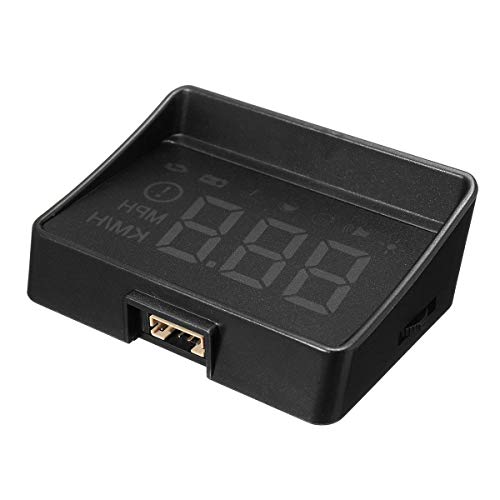
You get instant access to critical driving data with the 3.5-inch Car HUD Head-Up Display that connects directly to your vehicle’s OBD2 port. It supports 95% of vehicles with OBD2 or EUOBD systems, including hybrids and models with auto stop/start. The HD screen uses nano-technology to minimize double reflection, boosting clarity. Brightness adjusts automatically or manually to suit lighting conditions. I see real-time speed in mph or km/h, engine temperature, battery voltage, and mileage. Overspeed, high temperature, and low voltage trigger audible alerts. It powers on and off with the ignition, preserving battery life. No wiring is needed-just plug and play.
Best For: Drivers seeking a plug-and-play head-up display to monitor real-time vehicle performance and safety alerts without complex installation.
Pros:
- Instant access to key metrics like speed, engine temperature, battery voltage, and mileage via a clear 3.5-inch HD screen
- Automatic power sync with ignition and plug-and-play setup require no wiring or manual configuration
- Enhanced visibility with adjustable brightness and nano-technology reducing double reflections
Cons:
- Not compatible with Blade Electric Vehicles, limiting use for some EV owners
- May have variations in labeling, language, or fit due to international sales
- Audible alerts may be distracting to some drivers if not properly configured
Car HUD M7 Digital Speedometer OBD/GPS Gauge
An ideal choice for drivers of post-2008 gasoline vehicles seeking real-time diagnostics without complex installation is the Car HUD M7 Digital Speedometer by wiiyii. It runs on an OBD/GPS dual system, pulling data like speed, RPM, voltage, and water temperature. OBD mode works with most gasoline cars after 2008, while GPS mode supports all vehicles. The display projects onto your windshield, reducing eye strain-like fighter jet tech for your commute. It measures 3.54 x 2.09 x 1.02 inches, weighs 150 grams, and auto-adjusts brightness. CE, FCC, and ROHS certified, it’s safe, stable, and reliable.
Best For: Drivers of gasoline-powered vehicles manufactured after 2008 who want real-time driving diagnostics with minimal installation effort.
Pros:
- Utilizes OBD/GPS dual-system technology for accurate, real-time vehicle data including speed, RPM, voltage, and temperature
- Projects vital metrics onto the windshield to reduce driver distraction, featuring auto-brightness and unit customization
- Plug-and-play setup with no vehicle modifications required, certified safe by CE, FCC, and ROHS standards
Cons:
- Not compatible with electric vehicles, diesel engines, trucks, RVs, or modified vehicles via OBD mode
- Limited to OBD II support, excluding older vehicles manufactured before 2008
- Plastic construction may feel less durable compared to premium aftermarket automotive electronics
Factors to Consider When Choosing a Heads Up Display
You need a heads-up display that stays clear in any light, so check the brightness adjustment options-many models offer 200 to 1000 cd/m² with auto-dimming sensors. Make certain it connects easily to your car via OBD2 or GPS, since power source compatibility affects both setup and performance. Installation should take under 15 minutes, and a stable GPS signal ensures speed readings are accurate within ±1 mph.
Display Visibility Features
When sunlight floods the windshield or nighttime driving dims the cabin, maintaining clear display visibility becomes critical for safe operation. A high refresh rate of 10Hz ensures rapid, stable updates, delivering real-time speed data with minimal lag. You’ll react faster because the display keeps pace with actual vehicle performance. Anti-reflective metal shading and built-in light shields cut glare and ghosting, making the image sharp even in direct sun or while wearing polarized sunglasses. Look for displays using bright green, high-contrast output-this color maximizes legibility in all lighting. Large fonts enhance clarity, especially during long drives or for older drivers. These features work together to guarantee you read critical data at a glance, without straining. Clarity isn’t just convenient-it’s a core safety factor in modern HUD design.
Brightness Adjustment Options
Brightness adjustment options directly impact how well you read essential driving data under changing light conditions. Many HUDs use automatic brightness adjustment with built-in light sensors that respond to ambient lighting, ensuring clear visibility day and night. These intelligent sensors dynamically adapt display output during rapid changes, like entering or exiting tunnels. Some models include manual control with 11 brightness levels, letting you fine-tune luminance to your preference. Automatic photosensitive mode minimizes glare in dark settings and boosts brightness in direct sunlight, enhancing safety and reducing eye strain. For even better clarity, anti-reflective metal shading or integrated sunshields help eliminate ghosting and glare. Combining sensor-based automation with manual options gives you full control over readability. Always choose a HUD that balances responsive sensors with customizable settings for best performance in real-world driving conditions.
GPS Signal Accuracy
While GPS signal accuracy plays a critical role in delivering reliable speed and navigation data, not all heads-up displays perform equally under real-world conditions. You need a device with dual-mode GPS and BDS connectivity, capable of receiving signals from up to 32 satellites for faster, more stable tracking. A 10Hz refresh rate guarantees speed updates feel instantaneous, with typical deviations of only 0.6–1.8 mph. Environmental factors like tunnels, underground garages, heavy rain, or fog can interrupt satellite signals. Metallic window coatings or films on your windshield may also weaken reception. For best results, install your HUD in an area with a clear view of the sky. Some models let you calibrate displayed speed to match your vehicle’s actual speed, correcting minor discrepancies. This fine-tuning enhances accuracy when satellite conditions aren’t ideal. Choose wisely to maintain reliability across varied driving environments.
Power Source Compatibility
Since reliable power delivery directly impacts performance, choosing a heads-up display with proper power source compatibility guarantees seamless operation. You should confirm your HUD supports 5V USB input, as most use standard USB ports and rely on plug-and-play convenience. Avoid power sources exceeding 5V-higher voltages risk permanent damage to sensitive internal circuits. Check that your vehicle has a continuously powered USB port to prevent constant reboots at ignition. If not, select a model with auto power sync to the ignition system, which minimizes battery drain. Some HUDs retain GPS data with constant power, reducing satellite reacquisition time. Others quickly reconnect, so brief power loss isn’t critical. Prioritize devices matching your car’s electrical behavior. Proper voltage, stable supply, and smart power response guarantee reliability. Never assume USB compatibility-verify specifications directly.
Installation Ease Level
Getting your heads-up display up and running should be quick and hassle-free, especially when you choose a model designed for straightforward integration. Most units feature plug-and-play installation via USB, requiring no wiring or technical skills. OBD2-connected models plug directly into your car’s diagnostic port in seconds-no tools needed. These devices draw power and data from the port, syncing automatically with your vehicle’s systems. Dashboard or windshield mounting is equally simple, using adhesive pads or adjustable brackets that leave no residue. Installation averages 1 to 3 minutes. Automatic power-on at ignition eliminates manual switches. GPS-dependent units begin acquiring satellite signals immediately after startup, ensuring rapid data display. You get instant access to real-time metrics without delay. Look for models that integrate cleanly with your car’s layout, minimizing clutter and maximizing usability from the first drive.
Speed Alert Capabilities
A heads-up display that keeps you informed also keeps you safe, and one of its most effective tools is the speed alert system. You can set custom speed thresholds that trigger visual or audible warnings when exceeded, helping you maintain safe driving habits. Some models offer triple overspeed alerts with fixed or programmable limits-like 80, 120, and 150 km/h-adapting to changing speed zones. You’ll find systems with low, medium, and high warning levels, giving you layered feedback based on conditions. Certain HUDs integrate color-changing ambient lighting, shifting from blue to red as you speed, offering intuitive cues without distraction. You can also calibrate alerts to match your vehicle’s speedometer within 50–150% of actual speed, ensuring accuracy. These features give you precise, real-time feedback, keeping your focus on the road while staying within legal limits.
Day Night Performance
Clarity in every light matters when your safety depends on split-second decisions. Choose a HUD with intelligent light sensors that auto-adjust brightness for daytime and night visibility. These systems smoothly shift between environments, reducing eye strain and maintaining clear data. Look for models with anti-reflective metal shielding-it cuts glare and ghosting on the windshield, especially under direct sun or streetlights. Many offer manual brightness settings, typically 0–11 levels, so you can fine-tune display intensity. For night driving, pick units with dimmed red or green displays. These colors preserve your night vision and stay readable without distraction. Automatic dimming paired with non-intrusive hues guarantees the display stays visible yet unobtrusive. High-contrast fonts and anti-glare coatings further improve legibility. A well-balanced HUD adapts instantly, keeping critical info clear whether you’re in sunlight or darkness.
Vehicle Data Integration
When evaluating heads-up displays, integrating with your vehicle’s internal systems can greatly expand functionality beyond basic speed and navigation. HUDs that connect to your OBD2 port pull real-time data like engine RPM, coolant temperature, and battery voltage-far more than GPS-only models provide. Dual-mode units blend GPS and OBD2 inputs, seamlessly switching to GPS when OBD2 isn’t supported. OBD2-linked HUDs monitor over 100 parameters, including live data streams and fault codes, enabling advanced diagnostics. They power on and off with your ignition, preventing battery drain. You’ll also get customizable alerts-think overspeed warnings or low-voltage alarms-set to your vehicle’s specific thresholds. These features give you deeper insight into performance and potential issues. For maximum utility, choose a model with full OBD2 compatibility. It’s like having a digital co-pilot that speaks your car’s language.
Frequently Asked Questions
How Long Does Installation Typically Take?
Installation usually takes 30 to 60 minutes. You mount the display unit on your dashboard using adhesive pads or suction cups. You connect the power cord directly to your OBD-II port or fuse box. You route cables neatly along the windshield or under trim. Some models sync via Bluetooth, reducing wiring needs. No special tools are required. Most drivers complete setup without professional help. Always check vehicle compatibility first.
Can I Customize the Display Colors?
Yes, you can customize the display colors on most modern HUDs. Manufacturers include adjustable RGB settings to match your dash lighting or reduce eye strain. You’ll access these via the onboard menu or companion app. Color ranges cover 16.7 million options using 24-bit calibration. Adjust brightness too-typically 10,000 cd/m² max-to prevent glare. Proper calibration guarantees data stays visible without distorting ambient perception.
Does It Work With Tinted Windshields?
Yes, it works with tinted windshields, but performance depends on the tint type. Factory-tinted glass usually isn’t a problem because it uses uniform dye. Aftermarket films with metallic layers can block the HUD’s light. Check your windshield’s light transmittance-above 70% guarantees excellent visibility. If your tint is darker, the display may appear dim or scattered. Use an anti-reflective coating HUD model to improve clarity.
Is There a Warranty Included?
Yes, you get a warranty-usually 12 months from purchase. It covers defects in materials and workmanship under normal use. You must register the product online within 30 days to activate full coverage. Some brands extend it to 24 months with proof of purchase. The warranty doesn’t cover damage from accidents, drops, or unauthorized modifications. You’ll need the original receipt for service claims.
Will It Drain My Car Battery?
No, it won’t drain your car battery if installed correctly. These devices draw minimal power, typically 1–2 watts, similar to a dashboard clock. They activate only when your engine runs, syncing with the ignition circuit. Some models include voltage monitoring to shut off automatically if battery levels drop. With proper wiring and fuse tap usage, standby current is negligible. Always disconnect during long storage to prevent parasitic drain.